
Event Viewing
 PicoCTF forensics
We start with a Windows_Logs.evtx, .evtx files are usually processed in Windows, so I open a Windows VM.
I start with EricZimmerman’s tool EvtxECmd, I use --out to export a CSV for parsing:
PS > .\EvtxECmd.exe -f ..\..\..\Downloads\Windows_Logs.evtx --out out
EvtxECmd version 1.5.2.0

Author: Eric Zimmerman (saericzimmerman@gmail.com)
https://github.com/EricZimmerman/evtx

Command line: -f ..\..\..\Downloads\Windows_Logs.evtx

Warning: Administrator privileges not found!

Maps loaded: 453

Processing C:\Mac\Home\Downloads\Windows_Logs.evtx...
Chunk count: 99, Iterating records...
Record #: 1817 (timestamp: 2024-07-15 16:46:18.6697512): Warning! Time just went backwards! Last seen time before change: 2024-07-15 16:46:38.9816621
Record #: 4029 (timestamp: 2024-07-15 16:59:21.8229048): Warning! Time just went backwards! Last seen time before change: 2024-07-15 16:59:38.9260830
Record #: 5692 (timestamp: 2024-07-15 17:01:09.3279087): Warning! Time just went backwards! Last seen time before change: 2024-07-15 17:01:44.9951378
Record #: 7070 (timestamp: 2024-07-15 17:02:38.6142607): Warning! Time just went backwards! Last seen time before change: 2024-07-15 17:03:27.2560767

Event log details
Flags: None
Chunk count: 99
Stored/Calculated CRC: 4E111818/4E111818
Earliest timestamp: 2024-07-15 15:55:14.0647632
Latest timestamp:   2024-07-15 17:07:04.7129092
Total event log records found: 8,619

Records included: 8,619 Errors: 0 Events dropped: 0

Metrics (including dropped events)
Event ID        Count
0               2
1               6
3               4
...
51047           4
51057           4

Processed 1 file in 9.1606 seconds
The description mentions that an application was installed, looking online they seem to be under Event ID’s 1033/1034! I use LibreOffice with the CSV to filter to EventID’s of only 1033 (as there are no 1034’s).
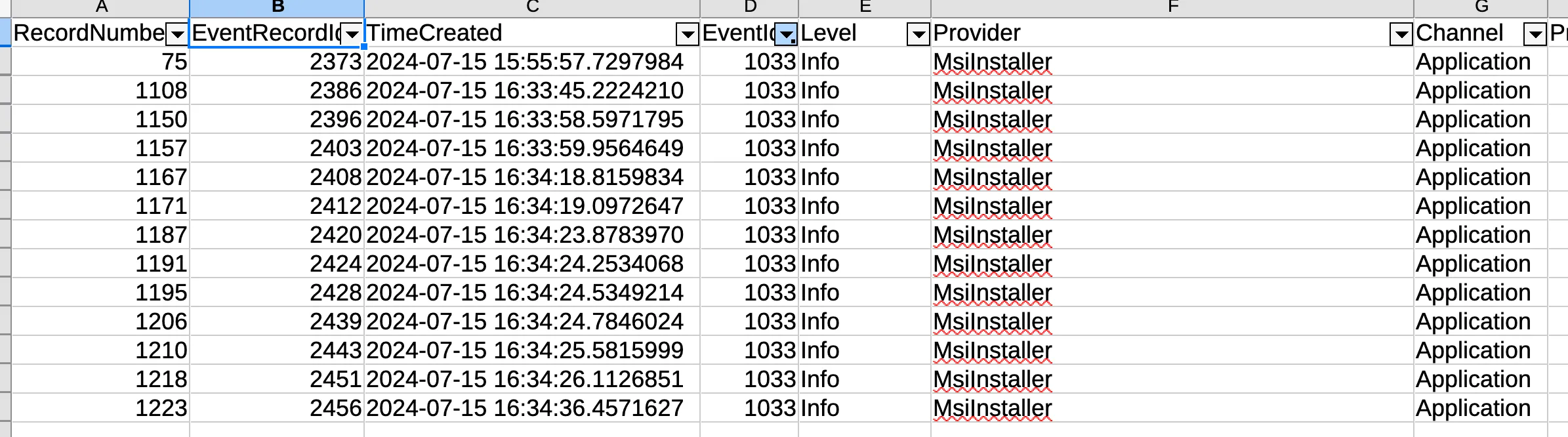
The PayloadData1 for Record 75 has some interesting info:
Name, Version, Lang, Status, Manufacturer: Totally_Legit_Software, 1.3.3.7, 0, 0, cGljb0NURntFdjNudF92aTN3djNyXw==, (NULL)
The Base64 string is of particular interest! Let’s decode it (You can use CyberChef, Dcode.fr, etc. I use the base64 utility).
$ echo "cGljb0NURntFdjNudF92aTN3djNyXw==" | base64 -d
picoCTF{Ev3nt_vi3wv3r_
Looks like a partial flag!
Let’s now look for the second event, where they run the ‘Totally_Legit_Software’. Event ID 4688 is for a creation of a new process but there’s not much of interest…
We could look for part 3 with Event ID 1074 (Shutdown initiated)?
I do a CTRL+F for ‘Shutdown’ and find record 186, which has a registry change with a suspiscious value:
Value Name: Immediate Shutdown (MXNfYV9wcjN0dHlfdXMzZnVsXw==)
Decoding the Base64 again:
$ echo "MXNfYV9wcjN0dHlfdXMzZnVsXw==" | base64 -d
1s_a_pr3tty_us3ful_
Seems like we found part 2!
Now considering both of the flag have been encoded with base64, I can bet that the Base64 representation for the end of the flag } will be in the string.
$ echo "}" | base64
fQo=
Let’s look for fQo… nothing…
Maybe we can use Event Viewer, the default windows tool (ew).
I filter for Event ID 1074 to make sure I didn’t miss anything:
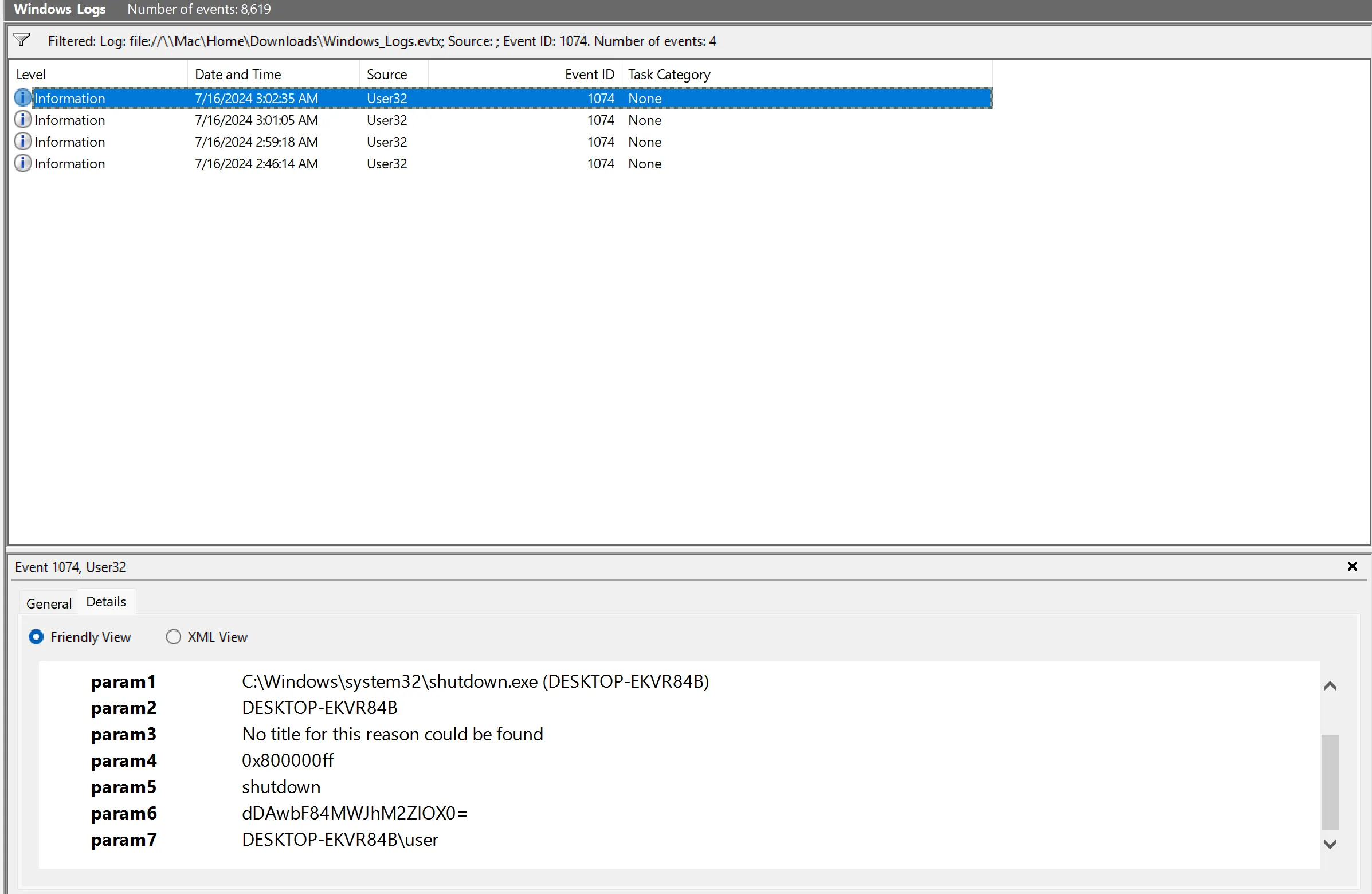
For some reason EvtxECmd failed and didn’t export the value in param6 in the CSV but it exported correctly in the full ‘Payload’ section. I decode it and get the final flag part:
$ echo "dDAwbF84MWJhM2ZlOX0=" | base64 -d
t00l_81ba3fe9}
Flag: picoCTF{Ev3nt_vi3wv3r_1s_a_pr3tty_us3ful_t00l_81ba3fe9}
Related Writeups
Chunked Integrity
This is one of my favorite images! Unfortunately something has gone wrong and I cant see the whole thing, can you help f ...
Just Packets
Here pcap. Find flag.
Keeping on Schedule
One of our computers on the company network had some malware on it. We think we cleared of the main payload however it c ...